
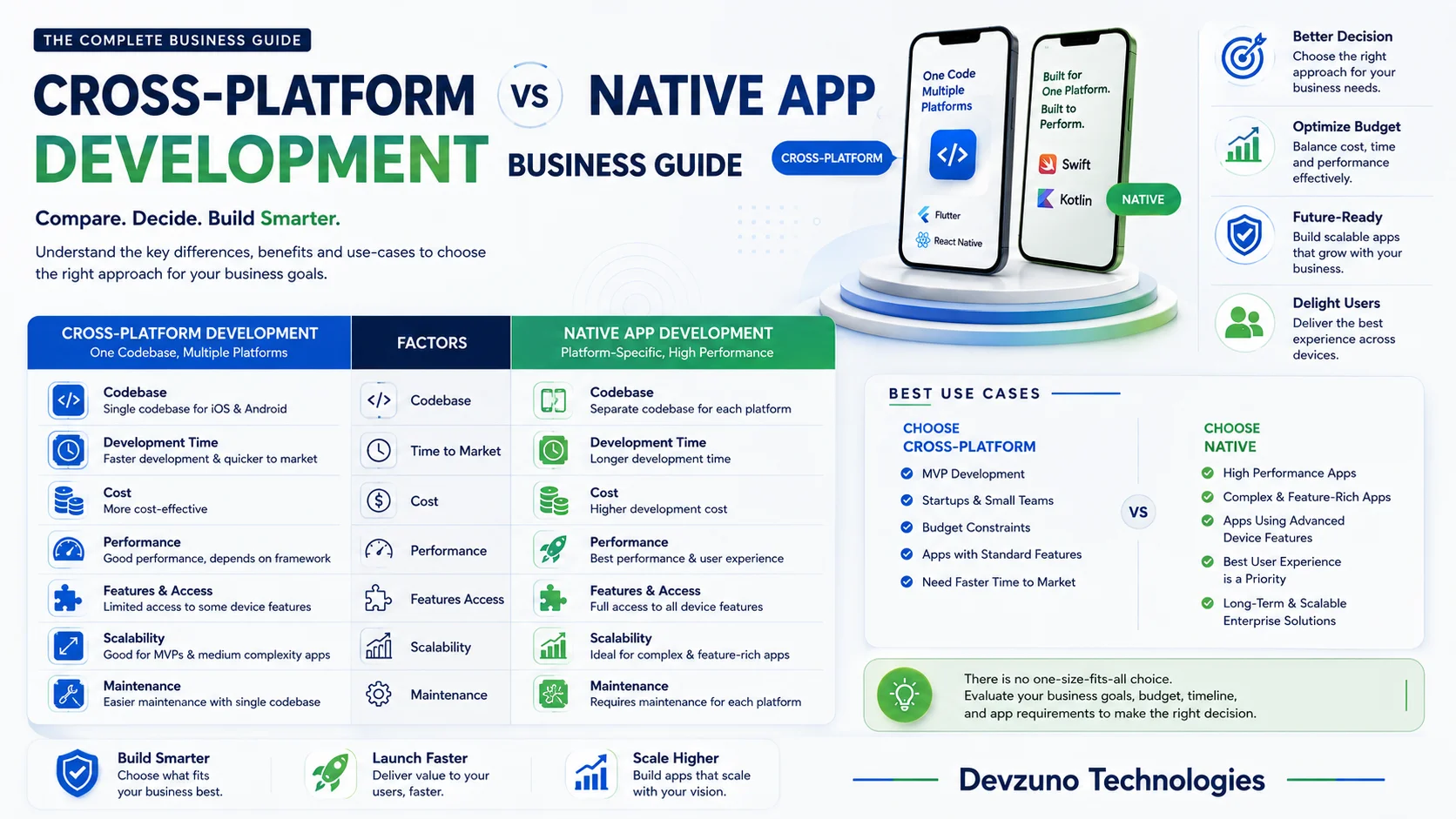
When launching a new mobile application in 2026, every founder, CTO, and product owner faces a pivotal architectural decision: Should you build separate Native apps for iOS and Android, or leverage modern Cross-Platform frameworks like Flutter or React Native?
This decision impacts your upfront development budget, time-to-market speed, user experience, and long-term software maintenance costs. Choosing the wrong framework can inflate initial development costs by 2x or result in a sluggish app that frustrates users.
In this comprehensive engineering and business guide, we evaluate Native Swift/Kotlin, Flutter (Dart), and React Native (TypeScript). We examine rendering architecture under the hood, compare upfront costs in Indian Rupees (₹) and USD ($), benchmark 60-120 FPS performance, analyze code implementation patterns, explore security protocols, and provide a decision matrix to choose the perfect tech stack for your business.
1. Understanding the Core Architectural Differences
To understand why development costs and performance vary across mobile frameworks, we must look at how each technology renders UI elements and communicates with mobile hardware.
[Native Apps]         --> Swift/Kotlin --> Direct OS Native UI Controls
[Flutter Apps]        --> Dart Engine  --> Canvas Direct Skia/Impeller Rendering (Zero Bridge)
[React Native Apps]   --> JS/TypeScript --> JSI/Fabric Bridge --> OS Native Widgets
A. Native App Development (iOS Swift / Android Kotlin)
Native development involves building two entirely separate mobile applications using Apple’s official language (Swift / SwiftUI) for iOS and Google’s official language (Kotlin / Jetpack Compose) for Android.
- Pros: Direct access to 100% of native OS features on day one, maximum GPU frame rates, and zero abstraction layers.
- Cons: Requires hiring two separate engineering teams, double the upfront build budget (₹8 Lakhs – ₹35 Lakhs+), and maintaining two distinct codebases indefinitely.
B. Flutter Development (Google’s Cross-Platform Engine)
Created by Google, Flutter uses the Dart programming language and its own high-performance C++ rendering engine (Impeller / Skia). Instead of converting code into native OS widgets, Flutter renders every pixel directly onto the screen canvas.
- Pros: 95%+ shared single codebase for iOS and Android, pixel-perfect UI consistency across all devices, fluid 60-120 FPS performance, and 35% to 50% lower upfront development cost.
- Cons: Slightly larger initial APK/IPA binary file size (~4MB base overhead).
C. React Native Development (Meta’s Cross-Platform Framework)
Created by Meta (Facebook), React Native allows developers to write mobile apps using JavaScript / TypeScript and React paradigms. It bridges JavaScript code to trigger native iOS and Android UI components via its modern JSI (JavaScript Interface) and Fabric architecture.
- Pros: 80-90% shared codebase, massive ecosystem of npm packages, and ideal for teams with existing web React expertise.
- Cons: UI appearance depends on underlying native OS updates, bridge performance overhead for heavy animations.
2. Technical Code Comparison: How Features Are Built
To understand the practical engineering differences, let us examine how a common feature—such as fetching user data from an API and updating the UI—is implemented across Flutter, React Native, and Native Swift:
A. Flutter Implementation (Dart + BLoC / Riverpod State Management)
// Flutter State Management Example (Clean & Predictable)
class UserNotifier extends StateNotifier<UserState> {
  UserNotifier(this._repository) : super(UserState.initial());
  final UserRepository _repository;

  Future<void> fetchUserData(String userId) async {
    state = UserState.loading();
    try {
      final user = await _repository.getUser(userId);
      state = UserState.success(user);
    } catch (e) {
      state = UserState.error(e.toString());
    }
  }
}- Takeaway: Flutter’s state management keeps business logic strictly separated from UI widgets, resulting in zero UI freezes and easy automated unit testing.
B. React Native Implementation (TypeScript + React Hooks)
// React Native State Hook Example
export const UserProfile = ({ userId }: { userId: string }) => {
  const [user, setUser] = useState<User | null>(null);
  const [loading, setLoading] = useState<boolean>(true);

  useEffect(() => {
    fetchUser(userId)
      .then((data) => setUser(data))
      .finally(() => setLoading(false));
  }, [userId]);

  return loading ? <ActivityIndicator /> : <Text>{user?.name}</Text>;
};- Takeaway: Web React developers adapt to React Native instantly due to familiar hooks (
useState,useEffect) and JSX syntax.
3. Ultimate Benchmarking Comparison Matrix (2026 Edition)
Below is a detailed engineering and business comparison of Native, Flutter, and React Native across key metrics:
| Metric / Evaluation Criteria | Native iOS (Swift) & Android (Kotlin) | Flutter (Google / Dart) | React Native (Meta / TypeScript) |
|---|---|---|---|
| Upfront Cost (INR - ₹) | Highest (₹8 Lakhs – ₹35 Lakhs+) | Optimized (₹1.5 Lakhs – ₹12 Lakhs) | Optimized (₹1.8 Lakhs – ₹14 Lakhs) |
| Upfront Cost (USD - $) | $10,000 – $45,000+ | $1,800 – $15,000 | $2,200 – $17,000 |
| Code Base Sharing | 0% (Two separate codebases) | 95%+ Shared Single Codebase | 80% – 90% Shared Codebase |
| Time to Market (MVP) | 14 – 24 Weeks | 6 – 10 Weeks (Fastest) | 8 – 14 Weeks |
| Rendering Performance | Native Maximum (120 FPS) | Fluid 60–120 FPS (Direct Impeller Engine) | Smooth 60 FPS (JSI Bridge) |
| UI Consistency Across Devices | Varies by OS version | 100% Identical Pixel-Perfect | Native OS styled |
| Hardware Access (Camera, NFC, GPS) | Direct Instant OS APIs | Native Platform Channels / Plugins | Native Modules |
| Long-Term Maintenance Cost | High (Maintain 2 codebases) | Low (Single codebase updates) | Moderate |
4. Financial Breakdown & Long-Term Maintenance ROI
For startups and small-to-medium enterprises (SMEs) in India, capital efficiency is paramount. Choosing a cross-platform framework dramatically alters your financial projection over a 3-year lifecycle.
Upfront Development Budget Comparison
- Dual Native Build (iOS + Android):
- Senior Swift Developer + Senior Kotlin Developer + Backend Engineer + QA.
- Total Initial Budget: ₹8 Lakhs – ₹25 Lakhs+ ($10,000 – $30,000+).
- Flutter Unified Build (iOS + Android):
- Senior Flutter Engineer + Backend Engineer + QA.
- Total Initial Budget: ₹1.5 Lakhs – ₹8 Lakhs ($1,800 – $9,500).
- Upfront Savings: 40% to 55% Cost Reduction.
Annual Maintenance Overhead (Year 2 & Year 3)
Every year, Apple releases a new iOS version and Google releases a new Android OS version.
- Native App Maintenance: You must update, test, and patch two separate codebases. Annual cost: ₹1.5 Lakhs – ₹4 Lakhs / year.
- Flutter App Maintenance: You update a single shared Flutter codebase once, compilation updates both iOS and Android apps simultaneously. Annual cost: ₹50,000 – ₹1.5 Lakhs / year.
5. Performance, FPS & Hardware Access Benchmarks
A common myth is that cross-platform apps are sluggish. In 2026, modern compilation technology has eliminated this performance gap for 95% of business applications.
A. Frame Rate & Smooth Animations (60 vs. 120 FPS)
- Native Apps: Achieves 120 Hz ProMotion display rates seamlessly because UI widgets are compiled directly by native OS tools.
- Flutter Apps: Flutter’s new Impeller rendering engine pre-compiles shaders ahead of time (AOT - Ahead of Time compilation). This completely eliminates jank and delivers rock-solid 60 to 120 FPS smooth scrolling and complex Lottie animations.
- React Native Apps: Delivers smooth 60 FPS for standard navigation, but can experience frame drops during heavy real-time data calculations on the UI main thread.
B. Hardware Access & Bluetooth / NFC Integrations
- Native: Instant access to brand-new OS APIs released at WWDC or Google I/O on day zero.
- Flutter & React Native: Mature ecosystem plugins (like
geolocator,camera,flutter_blue_plus,nfc_manager) provide seamless hardware access. For custom hardware devices, developers write lightweight Native Platform Channels in Swift/Kotlin.
6. Cybersecurity, SSL Pinning & Code Obfuscation
Mobile app security is non-negotiable for fintech, e-commerce, and healthcare applications handling sensitive customer data.
A. Code Reverse-Engineering & Obfuscation
- Flutter Security: Flutter compiles Dart code into native ARM machine code binaries using Ahead-Of-Time (AOT) compilation. This makes reverse-engineering Flutter APKs/IPAs extremely difficult compared to decompiling Android Java/Kotlin bytecode or JavaScript bundles.
- React Native Security: Requires Hermes bytecode compilation and JavaScript obfuscation tools (like JSGuard or ProGuard) to prevent source code extraction.
B. Network Traffic Security (SSL Pinning & AES-256)
All three frameworks support strict SSL Certificate Pinning (preventing Man-in-the-Middle attacks) and AES-256 encrypted local storage (Flutter flutter_secure_storage or Android KeyStore / iOS Keychain).
7. Migration Framework: How to Switch from Native to Flutter
If your business currently maintains legacy native iOS/Android apps or slow WebView hybrid apps, migrating to Flutter provides immediate operational savings:
[Phase 1: API Audit]       --> Standardize REST/GraphQL Backend Endpoints
[Phase 2: Core Flutter UI] --> Rebuild UI Components using Shared Design System
[Phase 3: Database & Auth] --> Migrate Local Caches to Hive/Isar DB
[Phase 4: Store Swap]      --> Publish Flutter Build directly as Version Update on App Stores
Because Flutter builds native .apk, .aab, and .ipa binaries, you can upload a new Flutter build directly to your existing Google Play Console and Apple App Store listings—your existing users update smoothly without losing their accounts or app reviews.
8. Real-World Case Studies: Industry Leaders in 2026
Both global tech giants and high-growth Indian enterprises rely heavily on cross-platform engineering:
Global Leaders Using Flutter
- Google Pay: Reengineered its global payment app using Flutter, cutting codebase size by 35% and accelerating feature delivery across iOS and Android.
- BMW: Built its unified mobile vehicle companion app using Flutter to ensure identical digital experiences for millions of drivers worldwide.
- Alibaba & eBay: Use Flutter for high-concurrency e-commerce mobile applications.
Global Leaders Using React Native
- Meta (Facebook & Instagram): Built React Native to power cross-platform social feeds and ad management portals.
- Shopify & Coinbase: Use React Native for mobile commerce dashboards and crypto trading apps.
9. Business Decision Matrix: Which Framework Should You Choose?
To make an informed decision for your project, match your business goals with the guidelines below:
                      [Your Business Need]
                               |
       -------------------------------------------------
       |                                               |
[Limited Budget / Fast Speed]             [Heavy Custom 3D / OS Kernel]
  (Choose FLUTTER - ₹1.5L+)                (Choose NATIVE - ₹8L+)
Choose Flutter If:
- You want a single high-performance codebase targeting both iOS and Android.
- Your budget ranges from ₹1.5 Lakhs to ₹12 Lakhs ($1,800 – $15,000).
- You need fast time-to-market (launch MVP in 6 to 10 weeks).
- You require pixel-perfect UI consistency across flagship iPhones and budget Android devices.
- You are building E-Commerce, Healthcare, EdTech, On-Demand Delivery, or SaaS management apps.
Choose React Native If:
- Your internal team already consists of expert web React / TypeScript developers.
- You want to share utility code between a web dashboard and mobile app.
Choose Native Swift/Kotlin If:
- You are building low-level hardware drivers, heavy AR/VR spatial apps, or AAA mobile games.
- Budget and timeline are unlimited, and you can maintain two separate engineering teams.
10. Frequently Asked Questions (FAQ)
Q1. Is Flutter app performance truly comparable to Native app performance?
Yes. In 2026, Flutter uses its modern Impeller C++ rendering engine to compile directly into native GPU canvas instructions. This delivers 60 to 120 FPS ultra-smooth scrolling with zero UI lag. For 95% of business applications, users cannot distinguish between a Flutter app and a Native app.
Q2. Can Flutter compile to Web and Desktop applications?
Yes. From a single codebase, Flutter can compile directly to iOS, Android, Web (HTML5/WebAssembly), Windows, and macOS applications.
Q3. How does Flutter handle custom native hardware features?
Flutter utilizes Platform Channels to communicate directly with native Swift (iOS) or Kotlin (Android) code whenever low-level hardware or proprietary SDK integrations are required.
Q4. Is there a strong Flutter developer ecosystem in India?
Yes. India has become a leading global tech hub for Flutter engineering, providing access to experienced Flutter developers for fast scaling and cost-effective development.
Q5. Can an existing Native app be migrated to Flutter without losing existing users?
Yes. Because Flutter compiles to standard .aab (Android) and .ipa (iOS) binaries, you can push a Flutter update using your existing App Store bundle ID. Existing users will update smoothly without losing accounts or reviews.
11. Why Devzuno is the Leading Flutter & Mobile App Partner
At Devzuno Technologies, we specialize in engineering high-performance Flutter cross-platform mobile apps and full-stack web applications. When you build your mobile app with Devzuno, you benefit from:
- Maximum Budget Efficiency: High-end dual-OS mobile apps starting from ₹1.5 Lakhs for custom Flutter applications.
- Sub-Second Performance & 60-120 FPS UX: Clean architecture (BLoC / Riverpod state management) for ultra-fast, smooth user experiences.
- 100% Source Code Ownership: Full ownership of GitHub repositories, IP rights, and app store developer accounts from day one.
- Transparent Milestone Contracts: Pay in simple phases as development milestones are delivered.
- End-to-End Store Publishing: Complete setup for Apple App Store and Google Play Console publishing.
Ready to Build Your Mobile App with the Perfect Tech Stack?
Don’t spend double the budget on dual native builds when you can launch a high-performance Flutter mobile app in half the time.
👉 Contact Devzuno Technologies Today for a free technical consultation and a tailored engineering roadmap for your mobile app!